Jupyter Notebook Version Control
How should you handle version control and diffs for Jupyter notebooks?
When you write code in Jupyter, version control with git is not always easy. Change a single simple figure and you get a diff as hard to read as the one below.
@@ -27,27 +27,27 @@
     "import matplotlib.pyplot as plt\n",
     "import matplotlib.image as mpimg\n",
     "for x in range(10):\n",
-    "    print(x ** 2)"
+    "    print(x ** 3)"
    ]
   },
   {
    "cell_type": "code",
-   "execution_count": 4,
+   "execution_count": 5,
    "metadata": {},
    "outputs": [
     {
      "data": {
       "text/plain": [
-       "<matplotlib.image.AxesImage at 0x208fe7a5c88>"
+       "<matplotlib.image.AxesImage at 0x2089002d2e8>"
       ]
      },
-     "execution_count": 4,
+     "execution_count": 5,
      "metadata": {},
      "output_type": "execute_result"
     },
     {
      "data": {
-      "image/png": "iVBORw0KGgoAAAANSUhEUgAAAXcAAADTCAYAAAB6OlOyAAAAOXRFWHRTb2Z0d2FyZQBNYXRwbG90bGliIHZlcnNpb24zLjMuMywgaHR0cHM6Ly9tYXRwbG90bGliLm9yZy/Il7ecAAAACXBIWXMAAAsTAAALEwEAmpwYAAA0oklEQVR4nO3deXxU1fn48c8zyUz2FQIEEtYgiwIKERFBUQSsSwUVvrYW+boU/blhrVZQq3VrcStqXSq4gS1W/YqIiiggrQuILLIjEFlMwhJCFgJZJ/P8/sidNCBLtpk7mTnv1yuvzF1yzzlzM889c+6554iqYhiGYQQXh90ZMAzDMJqfCe6GYRhByAR3wzCMIGSCu2EYRhAywd0wDCMImeBuGIYRhHwS3EXkIhHZIiJZIjLZF2kYhmEYxyfN3c9dRMKArcAIIAdYAfxKVTc1a0KGYRjGcfmi5j4QyFLV7apaCfwLuNwH6RiGYRjH4Yvg3gHIrrOcY60zDMMw/CTcroRFZCIwESAmJmZAz5497cqKYRhGi7Rq1ap8VU051jZfBPdcIL3Ocpq17giqOh2YDpCZmakrV670QVYMwzCCl4jsOt42XzTLrAC6i0gXEXEBVwPzfJCOYRiGcRzNXnNXVbeI3AZ8BoQBr6vqxuZOxzAMwzg+n7S5q
.....
Here are a few ways around the difficulty of reading Jupyter notebook diffs.
1. Clear all notebook outputs before committing
If you strip the outputs and then commit, you get a relatively clean diff. For example, when a graph figure or image output changes, the binary change shows up as-is in the .ipynb diff; clearing the outputs before committing spares you the long binary diff. The downside is that the results are not saved.
2. Convert the .ipynb file to Python code and save that
You can convert .ipynb to .py. As with method 1, the downside is that the results are not saved.
jupyter nbconvert something.ipynb --to="python"3. Use nbdime
nbdime: Jupyter Notebook Diff and Merge tool. https://github.com/jupyter/nbdime
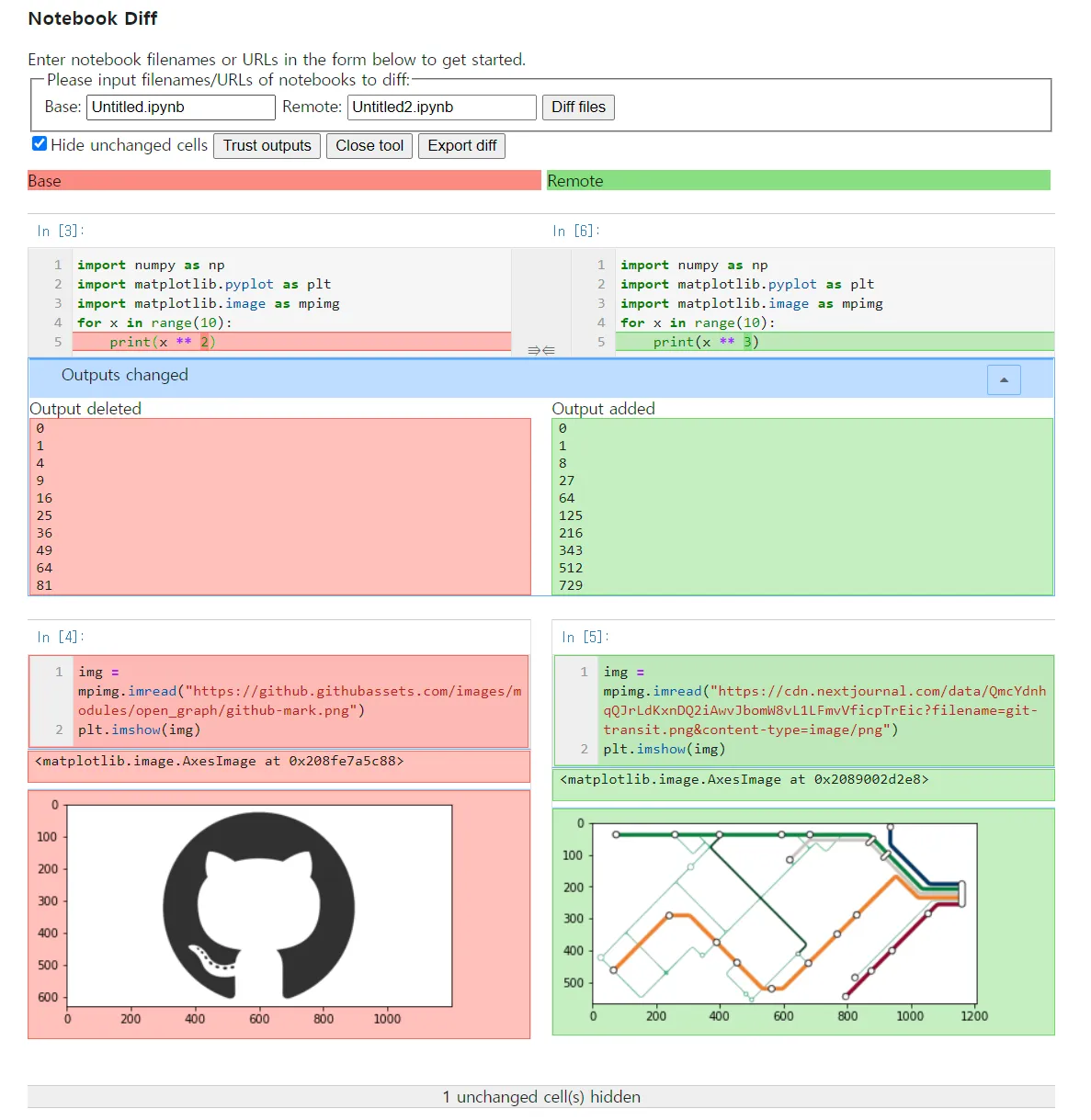
Think of it as a modified form of git diff. With nbdime you can read the diffs of Jupyter files intuitively.
- Check the diff on the command line
nbdiff commit1 commit2 filepathOutput:
## inserted before /cells/1:
+  code cell:
+    execution_count: 5
+    source:
+      img = mpimg.imread("https://cdn.nextjournal.com/data/QmcYdnhqQJrLdKxnDQ2iAwvJbomW8vL1LFmvVficpTrEic?filename=git-transit.png&content-type=image/png")
+      plt.imshow(img)
+    outputs:
+      output 0:
+        output_type: execute_result
+        execution_count: 5
+        data:
+          text/plain: <matplotlib.image.AxesImage at 0x2089002d2e8>
+      output 1:
+        output_type: display_data
+        data:
+          image/png: iVBORw0K...<snip base64, md5=aaad22f9e6b12552...>
+          text/plain: <Figure size 432x288 with 1 Axes>
+        metadata (unknown keys):
+          needs_background: light

## deleted /cells/1:
-  code cell:
-    execution_count: 4
-    source:
-      img = mpimg.imread("https://github.githubassets.com/images/modules/open_graph/github-mark.png")
-      plt.imshow(img)
-    outputs:
-      output 0:
-        output_type: execute_result
-        execution_count: 4
-        data:
-          text/plain: <matplotlib.image.AxesImage at 0x208fe7a5c88>
-      output 1:
-        output_type: display_data
-        data:
-          image/png: iVBORw0K...<snip base64, md5=2cbb1d38259c0c72...>
-          text/plain: <Figure size 432x288 with 1 Axes>
-        metadata (unknown keys):
- needs_background: light- Check the diff in a web view
nbdiff-web commit1 commit2 filepathOutput:
- Use nbdime by default in git
After running the command below, git diff shows .ipynb files, and only those, through nbdiff.
nbdime config-git --enable --globalReference
https://nextjournal.com/schmudde/how-to-version-control-jupyter